
Monitor QNAP Updates in Home Assistant
I run a QNAP TS-253D as the backbone of my home lab — and just like my WordPress site, I wanted to see its update status directly in Home Assistant without logging into the NAS admin panel every time. In this post I’ll walk you through how I set up a sensor that pulls QNAP firmware and app update information into HA via SSH, displaying it as a badge in the dashboard header alongside my other status indicators.
Why bother?
I already have a WordPress update badge in my HA header, so adding a QNAP one felt like a natural extension. One glance at the dashboard tells me whether anything needs attention — no separate logins required.
How it works
The setup has three parts:
- A shell script on the QNAP that checks for firmware and app updates and outputs JSON
- An SSH key so HA can connect to the QNAP without a password
- A
command_linesensor in HA that runs the script via SSH every 15 minutes
The shell script
The script lives on the QNAP at /share/homes/hass/ha-qnap-updates.sh. It uses two QTS built-in commands:
qpkg_cli -G all— checks all installed apps for available updates (upgradeStatus = 0means an update is available)getcfg System "Live Update Available"— returns1when a firmware update is pending
#!/bin/sh
# QNAP update status for Home Assistant

UPGRADABLE=$(qpkg_cli -G all 2>/dev/null | grep -B1 "upgradeStatus = 0" | grep "^[" | tr -d "[]")

APP_COUNT=0
APP_NAMES="[]"

if [ -n "$UPGRADABLE" ]; then
    APP_COUNT=$(echo "$UPGRADABLE" | wc -l | tr -d " ")
    APP_NAMES=$(echo "$UPGRADABLE" | awk 'BEGIN{printf "["} {printf "%s"%s"",(NR==1?"":","),$0} END{printf "]"}')
fi

FW_UPDATE=$(getcfg System "Live Update Available" -f /etc/config/uLinux.conf 2>/dev/null)
FW_AVAILABLE=0
if [ "$FW_UPDATE" = "1" ]; then
    FW_AVAILABLE=1
fi

TOTAL=$((APP_COUNT + FW_AVAILABLE))

printf '{"total_updates":%d,"firmware_update":%s,"app_updates":%s,"app_count":%d,"checked_at":"%s"}
'
    "$TOTAL"
    "$([ $FW_AVAILABLE -eq 1 ] && echo 'true' || echo 'false')"
    "$APP_NAMES"
    "$APP_COUNT"
    "$(date -u +%Y-%m-%dT%H:%M:%SZ)"
Make it executable:
chmod +x /share/homes/hass/ha-qnap-updates.sh
A note on firmware updates
During research I investigated whether firmware update detection could be included. Unfortunately, on QTS 5.x there is no reliable unauthenticated local API for this. The public QNAP XML feed (update.qnap.com/QTS_FW.xml) only lists firmware up to version 5.0.1 for this model family and is no longer maintained for newer versions. The actual firmware check happens via an authenticated cloud call that cannot be replicated locally. The sensor therefore covers app updates only — which is the more useful signal anyway, since firmware updates are prominently shown in the QTS dashboard.
SSH key authentication
Rather than storing a password, HA connects to the QNAP using an SSH key pair. From the HA terminal:
mkdir -p /config/.ssh
ssh-keygen -t ed25519 -f /config/.ssh/qnap_hass -N ""
cat /config/.ssh/qnap_hass.pub
Copy the public key output, then on the QNAP:
mkdir -p /share/homes/hass/.ssh
echo "YOUR_PUBLIC_KEY" >> /share/homes/hass/.ssh/authorized_keys
chmod 700 /share/homes/hass/.ssh
chmod 600 /share/homes/hass/.ssh/authorized_keys
sudo chown -R hass /share/homes/hass/.ssh
Test it from the HA terminal:
ssh -i /config/.ssh/qnap_hass -o StrictHostKeyChecking=no hass@192.168.1.95 "sh /share/homes/hass/ha-qnap-updates.sh"You should get a clean JSON response with no password prompt.
The Home Assistant sensor
Add this to your command_line sensor config:
- sensor:
    name: "QNAP Updates"
    unique_id: qnap_updates_nas
    command: "ssh -i /config/.ssh/qnap_hass -o StrictHostKeyChecking=no hass@192.168.1.95 'sh /share/homes/hass/ha-qnap-updates.sh'"
    scan_interval: 900
    value_template: "{{ value_json.total_updates }}"
    unit_of_measurement: "updates"
    icon: mdi:nas
    json_attributes:
      - firmware_update
      - app_updates
      - app_count
      - checked_at
After a full HA restart, sensor.qnap_updates is available. The state is the total number of pending updates; firmware and app details are in the attributes.
The header badge
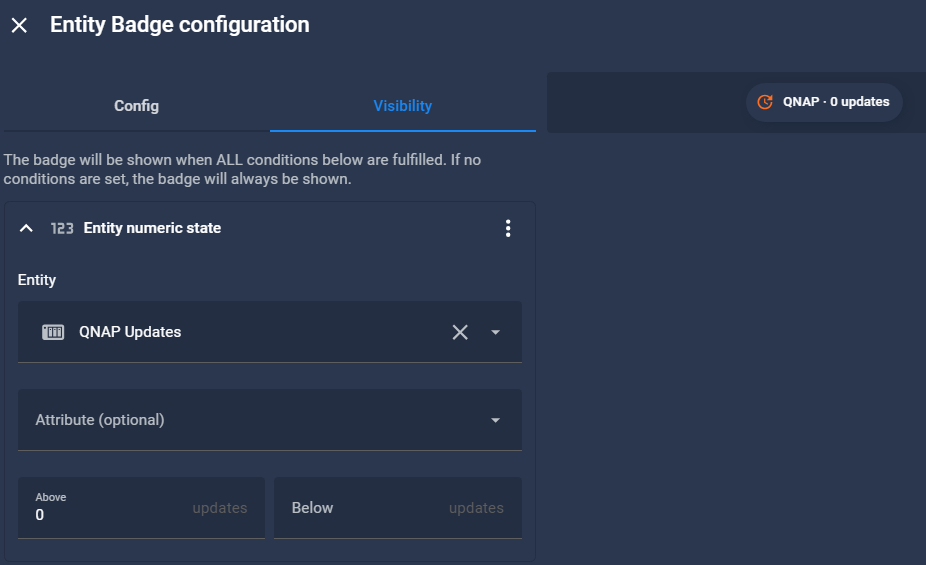
Just like the WordPress badge, I added this sensor to the HA dashboard header with visibility conditioned on the value being above 0. It shows up as QNAP · 0 updates when there is nothing to do, and disappears entirely when everything is up to date.
Wrapping up
A clean, lightweight integration that fits naturally alongside the existing WordPress update badge. The QNAP never needs to expose anything publicly — all communication stays on the local network over SSH. If you run a QNAP NAS in your home lab, this is a straightforward way to keep update awareness in one place.


