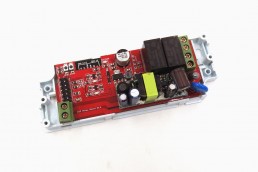
I recently added a Sonoff Hydro One Lite (SWV-ZNE) Zigbee water valve to my garden irrigation in Home Assistant. It paired fine through ZHA, switched on and off without problems, and my irrigation package started a 15 minute timer for that zone. Yet twice in one day, the valve shut itself off while the timer still had minutes left on the clock. My other Zigbee valve happily runs for two hours straight, so this one had me puzzled.
In this post I’ll show how I tracked down the cause, and what you need to bypass the built-in 10 minute limit on this valve when using ZHA.
The symptom: the valve closes before the timer ends
My setup is simple: a script opens the valve and starts a Home Assistant timer. When the timer finishes, an automation closes the valve and records the last watered time. In practice, the valve closed early while the timer kept counting down on my dashboard.
Finding the cause in the logbook
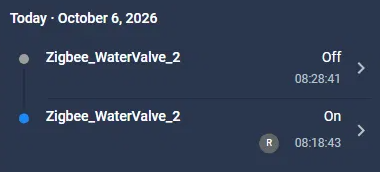
The Home Assistant logbook gave it away. Every On entry showed “By Rutger”, because I started the run from my dashboard. The Off entries had no context at all: no user, no automation, no script. That means Home Assistant never sent the off command. The device reported the state change by itself.
The timestamps were the second clue. On at 15:47:59, off at 15:57:59. On at 08:18:43, off at 08:28:41. Exactly 10 minutes, every time…
The cause: a fixed 10 minute default in the valve
The Sonoff Hydro One series (SWV-ZFE, SWV-ZFU, SWV-ZNE and SWV-ZNU) has a default watering time built into the device. With native ZHA support this was fixed at 10 minutes, and ZHA did not expose any setting to change it. The device page only showed the switch, battery, LQI and RSSI.
Important to know: when you switch the valve from Home Assistant, the valve treats this as a manual irrigation run. So every run started from Home Assistant hits that 10 minute safety limit, no matter how long your own timer or automation is set to.
The fix: install the Sonoff ZHA quirk
Sonoff released an enhanced ZHA quirk for the Hydro One series. It exposes the device configuration in Home Assistant, including the manual irrigation duration. You can download it from the Sonoff help center page for the SWV-ZFU/SWV-ZFE: https://help.sonoff.tech/docs/SWVZFU-SWVZFE
Step 1: create a quirks folder. Using File Editor, Studio Code Server or a Samba share, create the folder /config/custom_zha_quirks/ and place the downloaded .py file in it. If the download is a zip file, unpack it first.
Step 2: point ZHA to the folder. Add this to your configuration.yaml. If you already have a zha: block, add only the custom_quirks_path line to it.
zha:
  custom_quirks_path: /config/custom_zha_quirks/
Step 3: check and restart. Run Developer Tools, YAML, Check configuration, and then do a full restart of Home Assistant. A YAML reload is not enough, because quirks are only loaded when ZHA starts.
Step 4: verify the quirk. Open the valve’s device page and expand Zigbee info. The Quirk line should now show the Sonoff quirk class. If it still shows a generic device class, press the button on the valve to wake it up and click Reconfigure. As a last resort, remove and re-pair the device. Keep the same name so your entity IDs stay the same.
Setting the manual irrigation duration
After the quirk is applied, a set of new configuration entities appears on the device page. The one you need is 2.1 Manual irrigation duration. Don’t confuse it with 4.9 Scheduled Irrigation Duration, which only applies to schedules stored on the valve itself.
The field may look empty at first. The valve is a battery powered, sleepy device and has not reported its value yet, but it is still running on the 10 minute default.
- Press the button on the valve to wake it up.
- Set 2.1 Manual irrigation duration to a value above your longest planned run. My dashboard allows runs up to 120 minutes, so I chose 125 minutes.
- Refresh the device page to confirm the value was stored. If it jumps back, wake the valve and try again.
I deliberately did not set this to the maximum or try to disable it. Home Assistant’s timer stays in charge of closing the valve, and the valve’s own limit remains a hardware safety net in case Home Assistant or the Zigbee network fails during a run.
The result
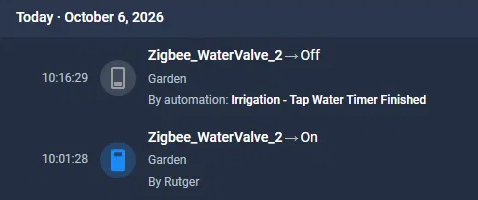
After the change I started a 15 minute run. The logbook now shows the valve turning on at 10:01:28 and turning off at 10:16:29, this time triggered by my Tap Water Timer Finished automation. Exactly as intended: Home Assistant decides when the watering stops, not the valve.
A few tips
- Use either Home Assistant or the valve’s built-in schedules, not both. Leave the schedule entities empty if Home Assistant handles your irrigation, otherwise the valve may open on its own.
- If you update the quirk file later, delete the __pycache__ folder inside custom_zha_quirks before restarting, or Home Assistant may keep using the old version.
- Have more than one Hydro One Lite valve? The same quirk covers all of them, but you need to set the manual irrigation duration on each device.
- Check your logbook when automations behave strangely. An Off without any “by” context almost always means the device did it itself.
If you run into the same 10 minute cutoff with your Sonoff water valve, I hope this saves you some head scratching. Let me know in the comments if it worked for you.