
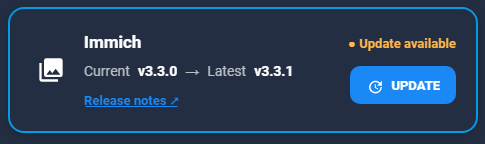
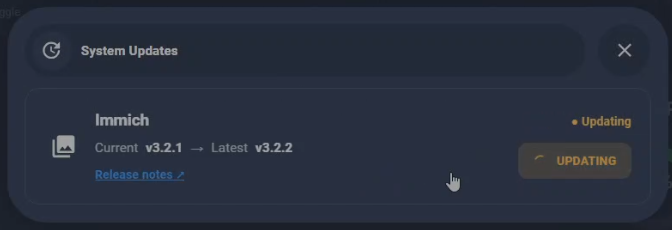
I run Immich in Docker inside an LXC container on my Proxmox host, and every new release meant opening a shell, jumping into the container and running docker compose by hand. I already had my Home Assistant dashboard telling me when a new Immich version was out, so the next step was obvious: an UPDATE button right on that card.
Getting the button to start the update was the easy part. Getting it to finish properly took a bit of debugging, because my button kept spinning on UPDATING forever. In this post I’ll share the complete setup and what I learned along the way.
How it fits together
- A custom button-card on my Home Assistant dashboard shows the current and latest Immich version number.
- The UPDATE button runs a Home Assistant script
- The script calls a shell_command that connects to Proxmox over SSH
- On Proxmox,
update-immich.shusespct execto run docker compose inside the Immich container (CT128) - When Immich is back up,
immich-update-check.shpublishes the new versions over MQTT - Home Assistant picks up the MQTT sensors and the card switches to Up to date
Step 1: The update script on Proxmox
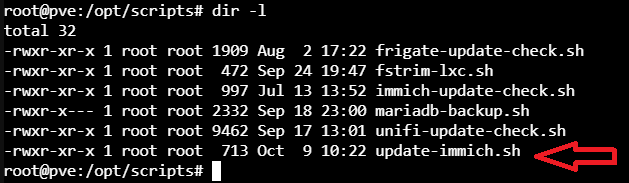
All my helper scripts live in /opt/scripts on the Proxmox host. The update script pulls the new image, restarts the container, cleans up old images and then refreshes the update status:
#!/bin/bash
set -e
echo "=== Immich update started: $(date) ==="
echo "Pulling latest Immich images..."
pct exec 128 -- bash -c 'cd /opt/immich && docker compose pull'

echo "Starting updated Immich containers..."
pct exec 128 -- bash -c 'cd /opt/immich && docker compose up -d'

echo "Removing unused Docker images..."
pct exec 128 -- bash -c 'docker image prune -f'

echo "Waiting for Immich to come back up..."
for i in $(seq 1 60); do
  if curl -fs http://192.168.1.28:2283/api/server/ping > /dev/null; then
    echo "Immich is up after $((i*5))s"
    break
  fi
  sleep 5
done

echo "Refreshing Immich update status..."
/opt/scripts/immich-update-check.sh

echo "=== Immich update completed: $(date) ==="
The wait loop is important. Without it, the update check runs right after docker compose up -d, while the Immich server is still starting. The check then can’t read the new version and the status never flips to Up to date. Now the script polls the Immich ping endpoint every 5 seconds (for up to 5 minutes) before it refreshes the status.
Step 2: The update check script
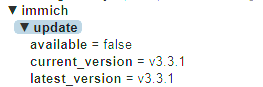
immich-update-check.sh compares the running Immich version with the latest release and publishes three values over MQTT, which become these sensors in Home Assistant:
sensor.mqtt_immich_current_versionsensor.mqtt_immich_latest_versionsensor.mqtt_immich_update_available
#!/bin/bash
MQTT_HOST="192.168.1.9"
MQTT_TOPIC_BASE="immich/update"
IMMICH_URL="http://192.168.1.28:2283"

CURRENT=$(curl -s "${IMMICH_URL}/api/server/version" \
  | sed -n 's/.*"major":\([0-9]*\).*"minor":\([0-9]*\).*"patch":\([0-9]*\).*/v\1.\2.\3/p')

LATEST=$(curl -s https://api.github.com/repos/immich-app/immich/releases/latest \
  | sed -n 's/.*"tag_name": *"\([^"]*\)".*/\1/p')

if [[ -z "$CURRENT" || -z "$LATEST" ]]; then
    echo "$(date -Is) Failed to retrieve version info (current=$CURRENT latest=$LATEST)"
    exit 1
fi

if [[ "$CURRENT" != "$LATEST" ]]; then
    UPDATE_AVAILABLE="true"
else
    UPDATE_AVAILABLE="false"
fi

mosquitto_pub -h "$MQTT_HOST" -t "${MQTT_TOPIC_BASE}/available" -m "$UPDATE_AVAILABLE" -r
mosquitto_pub -h "$MQTT_HOST" -t "${MQTT_TOPIC_BASE}/current_version" -m "$CURRENT" -r
mosquitto_pub -h "$MQTT_HOST" -t "${MQTT_TOPIC_BASE}/latest_version" -m "$LATEST" -r

echo "$(date -Is) Current: $CURRENT | Latest: $LATEST | Update available: $UPDATE_AVAILABLE"
Step 3: SSH from Home Assistant to Proxmox
Home Assistant needs its own SSH key, stored under /config so it survives restarts. From the Home Assistant terminal (192.168.1.14 is the IP address of the Proxmox host):
mkdir -p /config/.ssh
ssh-keygen -t ed25519 -f /config/.ssh/id_ed25519_proxmox -N ""
ssh-copy-id -i /config/.ssh/id_ed25519_proxmox.pub root@192.168.1.14
Then the shell_command itself:
# config_shell_command.yaml
proxmox_update_immich: >-
  ssh -i /config/.ssh/id_ed25519_proxmox
  -o UserKnownHostsFile=/config/.ssh/known_hosts
  -o StrictHostKeyChecking=accept-new
  -o BatchMode=yes
  -o ConnectTimeout=10
  root@192.168.1.14
  "nohup /opt/scripts/update-immich.sh > /var/log/update-immich.log 2>&1 < /dev/null &"
Two things matter here. First, BatchMode=yes and ConnectTimeout=10 make SSH fail fast instead of hanging on a prompt. Second, Home Assistant kills a shell_command after 60 seconds, and pulling new Immich images takes longer than that. So the command starts the update in the background with nohup, redirects all output to a log file and returns immediately. The redirects and < /dev/null are needed, otherwise SSH keeps waiting for the background process anyway.
Step 4: The Home Assistant script
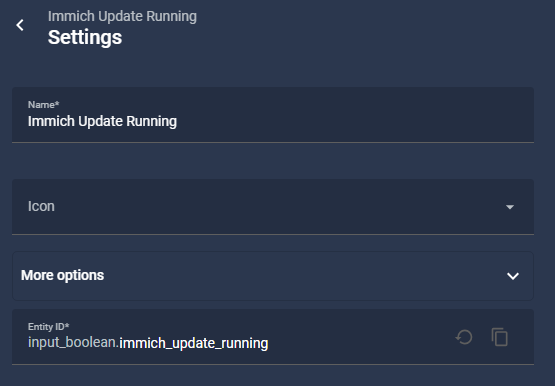
First I created a toggle helper, input_boolean.immich_update_running, which the card uses to show the UPDATING state.
Then the Home Assistant script:
proxmox_update_immich:
  alias: Proxmox - Update Immich
  description: Runs the Immich update on Proxmox and tracks update progress
  mode: single
  sequence:
    - condition: state
      entity_id: sensor.mqtt_immich_update_available
      state: "true"
    - action: input_boolean.turn_on
      target:
        entity_id: input_boolean.immich_update_running
    - action: shell_command.proxmox_update_immich
      response_variable: ssh_result
    - if:
        - condition: template
          value_template: "{{ ssh_result.returncode != 0 }}"
      then:
        - action: input_boolean.turn_off
          target:
            entity_id: input_boolean.immich_update_running
        - stop: "SSH to Proxmox failed"
          error: true
    - wait_template: "{{ states('sensor.mqtt_immich_update_available') | lower == 'false' }}"
      timeout: "00:20:00"
      continue_on_timeout: true
    - if:
        - condition: template
          value_template: "{{ not wait.completed }}"
      then:
        - action: persistent_notification.create
          data:
            title: Immich update
            message: "No 'up to date' status after 20 min. Check /var/log/update-immich.log on Proxmox."
    - action: input_boolean.turn_off
      target:
        entity_id: input_boolean.immich_update_running
The script turns the boolean on, starts the update over SSH and checks the SSH return code. If SSH fails, it resets the boolean right away. Otherwise it waits until the update sensor reports false, with a 20-minute timeout. Whatever happens, the last step always turns the boolean off again, and if the update didn’t finish in time I get a notification pointing me to the log.
Step 5: The dashboard card
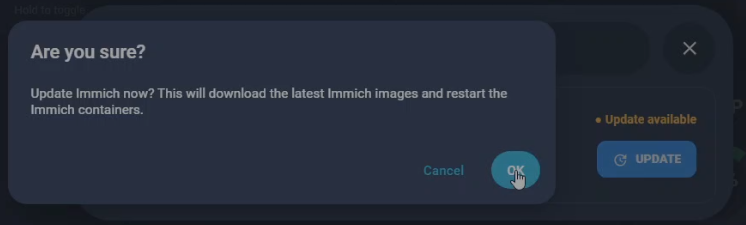
The card is a custom:button-card (HACS) with a nested button-card for the update button. The button only does something when an update is available and no update is running, it asks for confirmation first, and the icon spins while the update runs. If you’re not interested in reading release notes first, you can use an automation instead that triggers the update script when mqtt update=true is received.
type: custom:button-card
entity: sensor.mqtt_immich_update_available
name: Immich
icon: mdi:image-multiple
show_state: false
show_label: false
show_icon: true
show_name: true
triggers_update:
  - sensor.mqtt_immich_update_available
  - sensor.mqtt_immich_current_version
  - sensor.mqtt_immich_latest_version
  - input_boolean.immich_update_running
tap_action:
  action: none
styles:
  card:
    - border-radius: 16px
    - padding: 18px 20px
    - background: transparent
    - border: 2px solid var(--info-color)
    - box-shadow: 0 2px 8px rgba(0,0,0,0.20)
    - overflow: hidden
  grid:
    - grid-template-areas: |
        "i n status"
        "i versions update"
        "i release update"
    - grid-template-columns: 42px 1fr auto
    - grid-template-rows: 30px 28px 28px
    - column-gap: 12px
  icon:
    - width: 28px
    - color: var(--primary-text-color)
  name:
    - justify-self: start
    - align-self: center
    - font-size: 17px
    - font-weight: 600
    - color: var(--primary-text-color)
  custom_fields:
    status:
      - justify-self: end
      - align-self: center
    versions:
      - justify-self: start
      - align-self: center
    release:
      - justify-self: start
      - align-self: center
    update:
      - justify-self: end
      - align-self: center
custom_fields:
  status: |
    [[[
      const running =
        states['input_boolean.immich_update_running']?.state === 'on';

      const available =
        entity.state === 'true' ||
        entity.state === 'on' ||
        entity.state === '1';

      if (running) {
        return `
          <span style="
            color:#ffb74d;
            font-size:13px;
            font-weight:600;
          ">
            ● Updating
          </span>
        `;
      }

      if (available) {
        return `
          <span style="
            color:#ffb74d;
            font-size:13px;
            font-weight:600;
          ">
            ● Update available
          </span>
        `;
      }

      return `
        <span style="
          color:#66bb6a;
          font-size:13px;
          font-weight:600;
        ">
          ● Up to date
        </span>
      `;
    ]]]
  versions: |
    [[[
      const current =
        states['sensor.mqtt_immich_current_version']?.state ?? 'Unknown';

      const latest =
        states['sensor.mqtt_immich_latest_version']?.state ?? 'Unknown';

      return `
        <div style="
          display:flex;
          align-items:center;
          gap:8px;
          font-size:14px;
          white-space:nowrap;
        ">
          <span style="color:var(--secondary-text-color);">
            Current
          </span>

          <strong style="color:var(--primary-text-color);">
            ${current}
          </strong>

          <span style="color:var(--secondary-text-color);">
            →
          </span>

          <span style="color:var(--secondary-text-color);">
            Latest
          </span>

          <strong style="color:var(--primary-text-color);">
            ${latest}
          </strong>
        </div>
      `;
    ]]]
  release:
    card:
      type: custom:button-card
      name: Release notes ↗
      show_icon: false
      show_state: false
      tap_action:
        action: url
        url_path: https://github.com/immich-app/immich/releases
      styles:
        card:
          - background: transparent
          - border: none
          - box-shadow: none
          - padding: 0
          - margin: 0
          - min-height: 0
        grid:
          - grid-template-areas: '"n"'
          - grid-template-columns: auto
        name:
          - justify-self: start
          - font-size: 13px
          - font-weight: 600
          - color: var(--primary-color)
          - text-decoration: underline
  update:
    card:
      type: custom:button-card
      entity: sensor.mqtt_immich_update_available
      show_name: true
      show_icon: true
      show_state: false
      triggers_update:
        - sensor.mqtt_immich_update_available
        - input_boolean.immich_update_running
      icon: |
        [[[
          const running =
            states['input_boolean.immich_update_running']?.state === 'on';

          return running
            ? 'mdi:loading'
            : 'mdi:update';
        ]]]
      name: |
        [[[
          const running =
            states['input_boolean.immich_update_running']?.state === 'on';

          const available =
            entity.state === 'true' ||
            entity.state === 'on' ||
            entity.state === '1';

          if (running)
            return 'UPDATING';

          return available
            ? 'UPDATE'
            : 'UP TO DATE';
        ]]]
      tap_action:
        action: |
          [[[
            const running =
              states['input_boolean.immich_update_running']?.state === 'on';

            const available =
              entity.state === 'true' ||
              entity.state === 'on' ||
              entity.state === '1';

            return (!running && available)
              ? 'perform-action'
              : 'none';
          ]]]
        perform_action: script.proxmox_update_immich
        confirmation:
          text: >-
            Update Immich now?

            This will download the latest Immich images and restart the Immich
            containers.
      styles:
        card:
          - border-radius: 10px
          - padding: 9px 16px
          - box-shadow: none
          - border: none
          - background: |
              [[[
                const running =
                  states['input_boolean.immich_update_running']?.state === 'on';

                const available =
                  entity.state === 'true' ||
                  entity.state === 'on' ||
                  entity.state === '1';

                if (running)
                  return 'rgba(255,183,77,0.18)';

                return available
                  ? 'var(--primary-color)'
                  : 'rgba(255,255,255,0.06)';
              ]]]
          - cursor: |
              [[[
                const running =
                  states['input_boolean.immich_update_running']?.state === 'on';

                const available =
                  entity.state === 'true' ||
                  entity.state === 'on' ||
                  entity.state === '1';

                return (!running && available)
                  ? 'pointer'
                  : 'default';
              ]]]
        grid:
          - grid-template-areas: '"i n"'
          - grid-template-columns: 18px auto
          - column-gap: 7px
        icon:
          - width: 17px
          - color: |
              [[[
                const running =
                  states['input_boolean.immich_update_running']?.state === 'on';

                return running
                  ? '#ffb74d'
                  : 'white';
              ]]]
          - animation: |
              [[[
                const running =
                  states['input_boolean.immich_update_running']?.state === 'on';

                return running
                  ? 'immich-spin 1s linear infinite'
                  : 'none';
              ]]]
        name:
          - font-size: 13px
          - font-weight: 700
          - color: |
              [[[
                const running =
                  states['input_boolean.immich_update_running']?.state === 'on';

                const available =
                  entity.state === 'true' ||
                  entity.state === 'on' ||
                  entity.state === '1';

                if (running)
                  return '#ffb74d';

                return available
                  ? 'white'
                  : 'var(--secondary-text-color)';
              ]]]
      extra_styles: |
        @keyframes immich-spin {
          from {
            transform: rotate(0deg);
          }
          to {
            transform: rotate(360deg);
          }
        }
The bug: a button stuck on UPDATING
My first version worked fine when I ran the script directly on Proxmox, but from the dashboard the button switched to UPDATING and never came back.
My first suspect was the 60-second shell_command limit, but my command was already fire-and-forget. The Home Assistant trace showed the real problem: the script was sitting on the wait_template. That wait had no timeout, and nothing after it turned the boolean off. Because the update check ran before Immich had finished starting, the update sensor stayed true, so the script waited forever.
The fix was the combination you see above: the wait loop in the update script, and a timeout plus a guaranteed reset in the Home Assistant script. My lessons:
- Always give a
wait_templatea timeout - Make the final cleanup step run no matter what
- Log the remote script to a file, so you can see whether it actually ran
- Wait for a service to be healthy before checking its version
Wrapping up
Immich updates are now one tap on my dashboard, with live status and a log on Proxmox if something goes wrong. The same pattern works for any Docker app in a Proxmox LXC, so Frigate and UniFi are next on my list.


