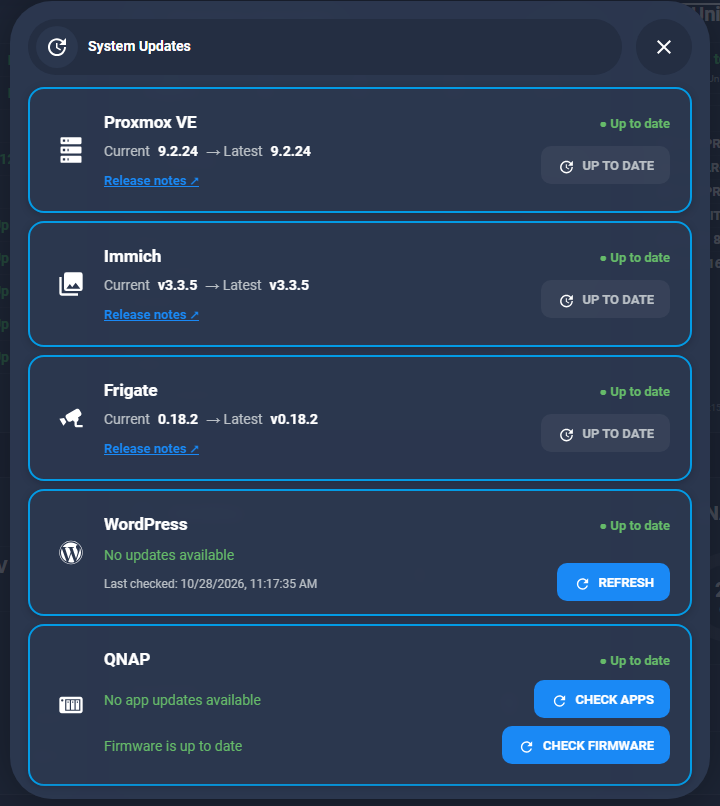
A few weeks ago I built a one-click Immich update button in Home Assistant, and since then Frigate, WordPress and QNAP joined it in my System Updates popup. One thing was still missing: the Proxmox host itself.
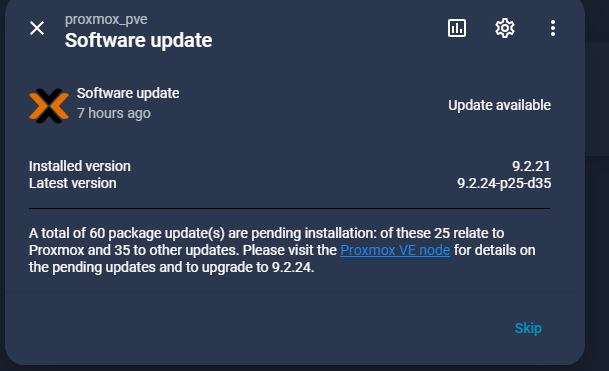
The Proxmox VE integration already tells me when there are updates. This morning it was 60 packages, from 9.2.21 to 9.2.24. But that update entity is tucked away on the device page, and installing the updates still meant logging into the Proxmox web interface and clicking through the Updates screen, or typing the apt commands in a shell.
So Proxmox got the same treatment as Immich. One button on my dashboard that upgrades the host over SSH, reports back over MQTT and tells me if I need to reboot. I also added a dry-run mode, because by the time I was done my host was already up to date and I still wanted to test the whole thing.
How it fits together
- The Proxmox VE integration gives me
update.proxmox_pve_software_update, which turns on when the host has pending packages. Proxmox refreshes its package list once a day by itself, so unlike Immich I didn’t need a separate check script. - A card in my System Updates popup shows the installed and the latest version, plus an UPDATE button.
- The button runs a Home Assistant script, which calls a shell_command that connects to Proxmox over SSH.
- On Proxmox,
update-proxmox.shrunsapt full-upgradenon-interactively in the background and publishes its status over MQTT. - Home Assistant reads the result from MQTT and sends me a notification, including whether I need to reboot.
Why full-upgrade, and why no automatic reboot
On Proxmox you should always use apt full-upgrade (or dist-upgrade). Plain apt upgrade can hold back packages that need new dependencies, and then you end up with a half-upgraded host. I also added two Dpkg options that keep my existing config files when a package comes with a new default. Otherwise apt can stop and ask a question, and there’s nobody there to answer it.
The script never reboots. My Home Assistant runs as a VM on this same Proxmox host, so an automatic reboot would kill the system that just pressed the button. The upgrade itself doesn’t touch running VMs and containers. A new kernel or QEMU version only becomes active after a reboot, and I’d rather pick that moment myself.
Step 1: The upgrade script on Proxmox
Like all my helper scripts, this one goes in /opt/scripts on the Proxmox host:
#!/usr/bin/env bash
# /opt/scripts/update-proxmox.sh
# Non-interactive Proxmox VE host upgrade, triggered from Home Assistant.
# Usage: update-proxmox.sh [--dry-run]
# Status is published (retained) as JSON to MQTT topic proxmox/pve/upgrade.
# Does NOT reboot: Home Assistant runs as a VM on this host.

set -u -o pipefail

MQTT_HOST="192.168.1.9"
MQTT_TOPIC="proxmox/pve/upgrade"
LOG="/var/log/update-proxmox.log"
LOCK="/run/update-proxmox.lock"

DRY_RUN=false
[[ "${1:-}" == "--dry-run" ]] && DRY_RUN=true

publish() {
  mosquitto_pub -h "$MQTT_HOST" -r -t "$MQTT_TOPIC" -m "$1" || echo "WARN: MQTT publish failed"
}

# Only one run at a time
exec 9>"$LOCK"
if ! flock -n 9; then
  echo "$(date -Is) Another upgrade is already running, exiting." >>"$LOG"
  exit 1
fi

exec >>"$LOG" 2>&1
echo "=================================================================="
echo "$(date -Is) Proxmox upgrade started (dry_run=$DRY_RUN)"
echo "Before: $(pveversion)"

publish "{\"status\":\"running\",\"dry_run\":$DRY_RUN,\"started\":\"$(date -Is)\"}"

export DEBIAN_FRONTEND=noninteractive
APT_OPTS=(-y -o Dpkg::Options::=--force-confdef -o Dpkg::Options::=--force-confold)
$DRY_RUN && APT_OPTS+=(-s)

status="ok"
if ! apt-get update; then
  echo "ERROR: apt-get update failed"
  status="failed"
elif ! apt-get "${APT_OPTS[@]}" full-upgrade; then
  echo "ERROR: apt-get full-upgrade failed"
  status="failed"
fi

# Dry run: packages that would be upgraded. Live run: packages still pending.
pending="$(apt-get -s full-upgrade 2>/dev/null | grep -c '^Inst ')"

# Reboot needed when the newest installed kernel is not the running one
running_kernel="$(uname -r)"
latest_kernel="$(ls -1 /boot/vmlinuz-* 2>/dev/null | sed 's|^/boot/vmlinuz-||' | sort -V | tail -n1)"
reboot_required=false
[[ -n "$latest_kernel" && "$latest_kernel" != "$running_kernel" ]] && reboot_required=true

version="$(pveversion | awk -F/ '{print $2}')"

echo "After:  $(pveversion)"
echo "Status: $status | pending: $pending | reboot_required: $reboot_required"
echo "$(date -Is) Proxmox upgrade finished"

publish "{\"status\":\"$status\",\"dry_run\":$DRY_RUN,\"reboot_required\":$reboot_required,\"version\":\"$version\",\"pending\":$pending,\"running_kernel\":\"$running_kernel\",\"latest_kernel\":\"$latest_kernel\",\"finished\":\"$(date -Is)\"}"

[[ "$status" == "ok" ]]
Some choices I made in this script:
- A lock file with
flock. If I tap the button twice by accident, the second run just stops. - All output goes to
/var/log/update-proxmox.log. When something goes wrong, that’s the first place I look. --dry-runadds-sto apt-get. apt then only simulates the upgrade, and the script counts how many packages it would install.- To find out if a reboot is needed, it compares the running kernel with the newest one in
/boot. - It sends a retained
runningmessage over MQTT when it starts, and a JSON message with the result when it’s done.
And don’t forget chmod +x /opt/scripts/update-proxmox.sh. I forget it every single time.
Step 2: The shell_command
Home Assistant already has an SSH key for Proxmox from the Immich setup (my Immich post shows how I created it), so this shell_command is almost a copy of the Immich one:
# config_shell_command.yaml
proxmox_update_pve: >-
  ssh -i /config/.ssh/id_ed25519_proxmox
  -o UserKnownHostsFile=/config/.ssh/known_hosts
  -o StrictHostKeyChecking=accept-new
  -o BatchMode=yes
  -o ConnectTimeout=10
  root@192.168.1.14
  "nohup /opt/scripts/update-proxmox.sh {{ '--dry-run' if dry_run | default(false) | bool else '' }} < /dev/null > /dev/null 2>&1 &"
The nohup part matters here. Home Assistant stops a shell_command after 60 seconds, and an upgrade of pve-manager restarts Proxmox services, which can kill the SSH session in the middle of the upgrade. Because it runs in the background, the SSH connection can drop and the upgrade just keeps going.
The template adds --dry-run when the script asks for it. Small catch: Home Assistant runs a shell_command with a template in it without a local shell. That’s no problem here, because the redirects and the & are inside the quoted part, and that part runs on Proxmox.
Step 3: The MQTT sensors
Two MQTT sensors read the JSON from the script. One for the status, one for the reboot flag.
# config_mqtt.yaml
sensor:
  - name: "Proxmox upgrade status"
    unique_id: proxmox_upgrade_status
    state_topic: "proxmox/pve/upgrade"
    value_template: "{{ value_json.status }}"
    json_attributes_topic: "proxmox/pve/upgrade"
    icon: mdi:server-network

binary_sensor:
  - name: "Proxmox reboot required"
    unique_id: proxmox_reboot_required
    state_topic: "proxmox/pve/upgrade"
    value_template: "{{ 'ON' if value_json.reboot_required | default(false) else 'OFF' }}"
    device_class: update
Step 4: The Home Assistant script
Just like with Immich, I first created a toggle helper, input_boolean.pve_update_running. The card uses it to show the UPDATING state. Then the script itself:
proxmox_update_pve:
  alias: Proxmox - Update PVE host
  description: Upgrades the Proxmox host packages via SSH and tracks the result over MQTT
  mode: single
  icon: mdi:server-network
  fields:
    dry_run:
      name: Dry run
      description: Simulate only (apt-get -s); nothing is installed
      default: false
      selector:
        boolean: {}
  sequence:
    - variables:
        dry: "{{ dry_run | default(false) | bool }}"
    # Live runs only when Proxmox actually reports updates
    - if:
        - condition: template
          value_template: "{{ not dry }}"
      then:
        - condition: state
          entity_id: update.proxmox_pve_software_update
          state: "on"
    - action: input_boolean.turn_on
      target:
        entity_id: input_boolean.pve_update_running
    - action: shell_command.proxmox_update_pve
      data:
        dry_run: "{{ dry }}"
      response_variable: ssh_result
    - if:
        - condition: template
          value_template: "{{ ssh_result.returncode != 0 }}"
      then:
        - action: input_boolean.turn_off
          target:
            entity_id: input_boolean.pve_update_running
        - stop: SSH to Proxmox failed
          error: true
    - wait_for_trigger:
        - trigger: state
          entity_id: sensor.proxmox_upgrade_status
          to:
            - "ok"
            - "failed"
      timeout: "00:45:00"
      continue_on_timeout: true
    - action: persistent_notification.create
      data:
        title: Proxmox upgrade
        notification_id: proxmox_upgrade
        message: >
          {% set s = states('sensor.proxmox_upgrade_status') %}
          {% set a = states.sensor.proxmox_upgrade_status.attributes %}
          {% if wait.trigger is none %}
          No result after 45 minutes. Check /var/log/update-proxmox.log on Proxmox.
          {% elif s == 'failed' %}
          Upgrade failed. Check /var/log/update-proxmox.log on Proxmox.
          {% elif a.dry_run %}
          Dry run OK: {{ a.pending }} package(s) would be upgraded (PVE {{ a.version }}).
          {% else %}
          Upgraded to PVE {{ a.version }}.
          {% if a.reboot_required %}Reboot needed: kernel {{ a.latest_kernel }} installed, running {{ a.running_kernel }}.{% else %}No reboot needed.{% endif %}
          {% endif %}
    - action: input_boolean.turn_off
      target:
        entity_id: input_boolean.pve_update_running
There’s one difference with my Immich script. This time I used wait_for_trigger instead of wait_template. The MQTT status is retained, so after the previous run the sensor already says ok. A wait_template would see that and continue straight away, before the upgrade even started. A state trigger only fires when the status really changes from running to ok or failed.
I also took my lessons from the stuck Immich button with me: the wait has a timeout, and the last step always turns the boolean off again.
Step 5: The dashboard card
In the meantime I turned my Immich card into a button-card template, app_update, which I now use for Proxmox, Immich and Frigate. For Proxmox only the data comes from a different place, so the card is pretty short:
type: custom:button-card
template: app_update
name: Proxmox VE
icon: mdi:server
entity: update.proxmox_pve_software_update
triggers_update:
  - update.proxmox_pve_software_update
  - input_boolean.pve_update_running
variables:
  app: pve
  confirm: Upgrade the Proxmox host packages now?
  st: |
    [[[
      const u = states['update.proxmox_pve_software_update'];
      const raw = u?.attributes?.latest_version ?? 'Unknown';
      const m = String(raw).match(/^(.*)-p(\d+)-d(\d+)$/);
      return {
        running: states['input_boolean.pve_update_running']?.state === 'on',
        avail: u?.state === 'on',
        current: u?.attributes?.installed_version ?? 'Unknown',
        latest: m ? `${m[1]} · ${Number(m[2]) + Number(m[3])} pkgs` : raw
      };
    ]]]
custom_fields:
  release: |
    [[[
      const url = 'https://pve.proxmox.com/wiki/Roadmap';
      return `<span role="link"
        style="font-size:13px;font-weight:600;color:var(--primary-color);cursor:pointer;text-decoration:underline"
        onclick="event.stopPropagation(); event.preventDefault(); window.open('${url}', '_blank', 'noopener');">Release notes ↗</span>`;
    ]]]
Not using templates? Then take the full card from my Immich post and swap the entities.
Two small things I ran into:
- The integration shows the latest version as
9.2.24-p25-d35, meaning 25 Proxmox packages and 35 other Debian packages. That long string wrapped on my phone, so the regex turns it into9.2.24 · 60 pkgs. - The Release notes link didn’t work, and it turned out it never worked on any of my cards. A normal
<a href>in a button-card custom field gets swallowed, because the card handles the click itself, and the Bubble Card popup around it doesn’t help either. Anonclickthat stops the event and opens the page withwindow.openfixed it on all three cards.
Testing with a dry run
By the time everything was in place, my host was already up to date, so there was nothing left to upgrade. That’s where the dry run comes in. In Developer Tools → Actions I ran:
action: script.proxmox_update_pve
data:
  dry_run: true
In dry-run mode the script skips the “update available” check and runs the whole chain with apt-get -s. The card switches to UPDATING, the status sensor goes from running to ok, and at the end a notification tells me how many packages would have been upgraded. If you want to test the Proxmox side on its own first, run /opt/scripts/update-proxmox.sh --dry-run on the host and check the result with tail /var/log/update-proxmox.log.
Wrapping up
Proxmox is now the first card in my System Updates popup, above Immich, Frigate, WordPress and QNAP. Updating the host is one tap and a confirmation. The reboot after a kernel update I still do myself, and I want to keep it that way.